> For the complete documentation index, see [llms.txt](https://wiki.lagland.ru/llms.txt). Markdown versions of documentation pages are available by appending `.md` to page URLs; this page is available as [Markdown](https://wiki.lagland.ru/server/connect.md).
# Вход на сервер
Базовая инструкция для входа на сервер.
Войти на сервер достаточно просто: для этого вам нужен клиент MINECRAFT нужной версии и наш IP-адрес. Мы всегда стараемся поддерживать актуальную версию клиента и прекращаем поддержку старых версий, как только считаем их совместимость с новыми недостаточно хорошей.
## ВЕРСИЯ КЛИЕНТА
Как уже было упомянуто выше, мы всегда стараемся, чтобы версия клиента была самой свежей, и прекращаем поддержку старых версий игры. На сегодняшний момент вы можете зайти с следующих версий:
**Минимальная** - 1.21.7
**Максимальная** - 1.21.8
Все указанные версии клиента актуальны для JAVA версии игры. Bedrock не поддерживается и не будет!
## IP-АДРЕС СЕРВЕРА
У сервера есть два доступных IP адреса для подключения, это:
mc.lagland.ru - основной.
play.lagland.ru - резервный.
## ДОБАВЛЕНИЕ СЕРВЕРА И ПОДКЛЮЧЕНИЕ К НЕМУ
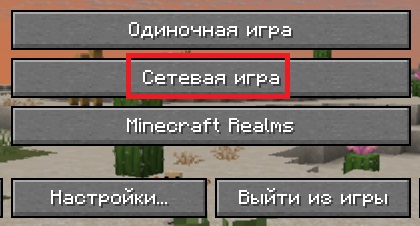
Чтобы подключиться к серверу, просто скопируйте один из указанных IP-адресов (лучше всего основной) и зайдите в игру. В главном меню игры выберете вторую строчку "сетевая игра".
Основное меню игры
Далее в нижней правой части экрана найдите кнопку "добавить" и нажмите ее.
Кнопки раздела сетевой игры
В появившихся графах вам нужно указать название сервера и его адрес. Название сервера видите только вы, поэтому остановим внимание на строке с адресом сервера. Туда нужно вставить наш IP-адрес **БЕЗ УКАЗАНИЯ ПОРТА**! Сделать это нужно так, как показано на изображении ниже.
Название сервера заполняете так как душе угодно!
После этого вам остается лишь нажать на кнопку 'Готово', и наш сервер будет добавлен в ваш список серверов. Если вы все сделали верно, то увидите примерно это:
Вид сервера в списке серверов вашего клиента.
---
# Agent Instructions
This documentation is published with GitBook. GitBook is the documentation platform designed so that both humans and AI agents can read, navigate, and reason over technical content effectively. Learn more at gitbook.com.
## Querying This Documentation
If you need additional information that is not directly available in this page, you can query the documentation by asking a question.
Perform an HTTP GET request on the following URL with the `ask` and `goal` query parameters:
```
GET https://wiki.lagland.ru/server/connect.md?ask=&goal=
```
`ask` is the immediate question: it should be specific, self-contained, and written in natural language.
`goal` is what the user is ultimately trying to achieve, the reason they need the answer. Sharing it helps GitBook give you a better, more relevant answer. A goal is most helpful when it describes the outcome the user wants rather than restating the question. For example, with `ask=how do I create an API token`, a goal like `automate deployments from our CI pipeline` lets GitBook tailor the answer to that use case.
The response will contain a direct answer to the question and relevant excerpts and sources from the documentation.
Use this mechanism when the answer is not explicitly present in the current page, you need clarification or additional context, or you want to retrieve related documentation sections.